
IP
Multicast
IP
multicast is a technique for one-to-many communication over an IP
infrastructure in a network. It scales to a larger receiver population by not
requiring prior knowledge of whom or how many receivers there are. Multicast
uses network infrastructure efficiently by requiring the source to send a
packet only once, even if it needs to be delivered to a large number of
receivers. The nodes in the network take care of replicating the packet to
reach multiple receivers only when necessary. For the addressing each group
there is a specific class to assign for multicasting. In the following sub
content IP multicast rang will show the reserved multicast addresses. These
allocations are done only in the IPV4 but in the new version of IPV6 addressing
are mainly base on multicasting, there is no any
broadcasting.
Multicast
IP range
In IPV4 there are several
classes separated to the usage of the users. The most famous classes are
the Class A, Class B and Class C. From these classes the Class D is
reserved for the multicasting.
Class D
Addresses Range
224 . 0 . 0 . 0
- 239 . 255 . 255 . 255
Within this range also
there are some sub categories further separate above mentioned IP range.
Reserved
for the IANA :
224 . 0 . 0 . 1 - 224
. 0 . 0 . 255
Global
Range
: 224 . 0 .
1 . 0 - 238 . 255 . 255 . 255
Supposed
To Work On The INTERNET
Originally
Designed For The Multicast BACKBONE (MBONE)
Designed
To Be Assigned Dynamically
Private Range
: 239 .
0 . 0 . 0 - 239 . 255 .
255 . 255
Designed
For Private Use (Within an Organization)
Can Be
Assigned Statically
IP
Multicast Protocols
IP
(Internet Protocol)
Is the
principal communications protocol used for relaying packets across an internet
work using the Internet Protocol Suite. Responsible for routing packets across
network boundaries, it is the primary protocol that establishes the internet.
IP is the primary protocol
in the Internet Layer of the Internet Protocol Suite and has the task of
delivering packets from the source host to the destination host solely based on
their addresses. For this purpose, IP defines addressing methods and structures
for packet encapsulation. The first major version of IP, now referred to as
Internet Protocol Version 4 (IPv4) is the dominant protocol of the Internet,
although the successor, Internet Protocol Version 6 (IPv6) is in active,
growing deployment worldwide.
UDP (User Datagram Protocol)
UDP (User Datagram Protocol)
One of
the core members of the Internet Protocol Suite, the set of network protocols
used for the Internet. With UDP, computer applications can send messages, in
this case referred to as datagrams, to other hosts on an Internet Protocol (IP)
network without requiring prior communications to set up special transmission
channels or data paths. In multicasting the packet transmission is not base on
the TCP/IP, they all in UDP base. Due to this there may be several problems are
took place because in UDP there is no error correction mechanism applied in
this application.
PIM (Protocol Independent Multicast)
PIM is Cisco's protocol for router to router tracking the multicast host client
to update the multicast server. This comes in three forms, Dense Mode (DM),
Sparse Mode (SM) and Sparse Dense mode.
Dense
Mode: Is the distribution of media to multiple
users within a data network where many or most of the users that are connected
to the network are part of the multicast group. In dense mode multicast
systems, the network is flooded with multicast messages and group members who
are not connected to the network are pruned from the multicast tree. Members of
a dense mode multicasting system often request connections to the multicast
group after the tree has been created.
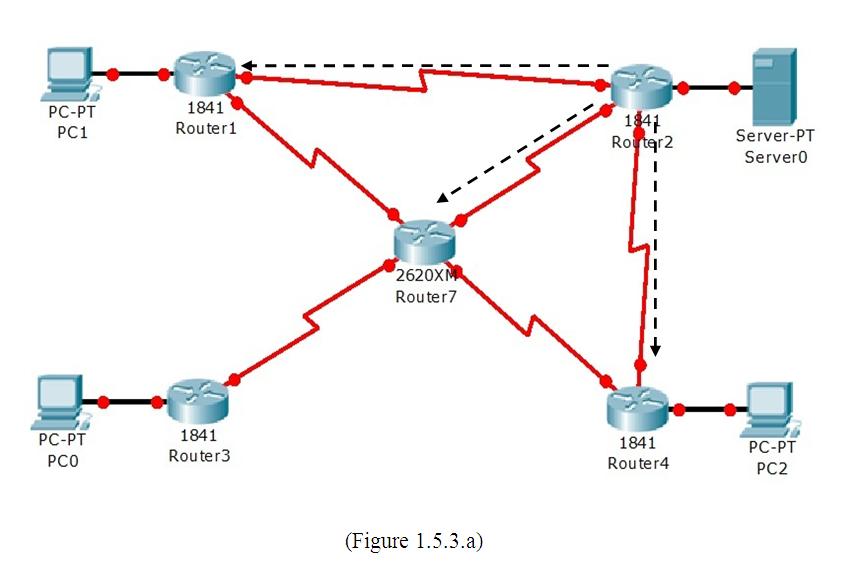 |
| Dense mode |
|
|
|
|
Sparse Mode: In this method
the media traffic is distributed as the dense mode but the initial setup is
different from it. Because there is RP (Rendezvous Point) which route the
request to the multicast group and pruning the other multicast client if they
are not connected to the multicast group.
 |
| Sparse Mode |
|
|
|
|
Sparse Dense Mode: There may be
routers in the network configure as sparse mode and dense mode. When the routers
are configure as sparse dense mode it can handle for the both routers configure
in dense and sparse mode.
IGMP (Internet Group Management Protocol)
This is the processes and procedures that are used to send control
messages and coordinate the multicasting of data through an Internet protocol
network. IGMP is used to establish membership into a multicast group that is
operating within a network. Using IGMP, users can inform routers within the
network that they would like to receive media and control messages from a
specific multicast group. There are three versions release by the CISCO for
IGMP (1,2, and 3).(Now the CISCO has implement in their routers IGMPV2 as the
default)
(Enhanced Interior Gateway Routing Protocol)
Is the enhance version of IGRP. It allows to fixed many problems in the
entire routing table. Along with rapid convergence discussed above, EIGRP
reduces bandwidth usage. It does this by not making scheduled updates but
sending updates only when topology changes occur. When EIGRP does send an
update, the update contains information only on the change in the topology,
which requires a path or metric change. Another plus is the fact that only the
routers that need to know about the change receive the update.
Throughout this article I hope you may get something.
This provides very basic explanation and future will cover more. Comments are
well come. Thank you.


